Why Choose Pay2Home for
International Money Transfers?
Low Fees & Competitive Exchange Rates
Save money on every transfer with transparent pricing and affordable remittance fees.
Fast International Transfers
Send money overseas quickly with same day or next day delivery to selected countries.
Safe & Secure Money Transfer
We protect your transactions through strong security systems and regulatory compliance.
24/7 Convenient Sending Options
Send money through our mobile app, online services, Money Transfer Machines (MTM), or branches.

Send Money in a Way That Works for You

Motorbike Installment Plans

Free Personal Accident Insurance
ABOUT PAY2HOME
Send money from Singapore
to 130+ countries










 Cambodia
 Australia
 Japan
Japan Korea, South
 Hong Kong S.A.R.
 Taiwan
 Pakistan
 Argentina
 Bahamas
 Bahrain
 Barbados
 Bosnia and Herzegovina
 Brazil
 Brunei
 Bulgaria
 Canada
 Chile
Chile Colombia
 Czech Republic
 Denmark
 Egypt
Egypt Fiji Island
 Hungary
 Iceland
 Israel
 Jamaica
 Kuwait
 Mauritius
 Mexico
 Mongolia
 Morocco
 Norway
 Oman
Oman Papua new Guinea
 Peru
Peru Poland
 Qatar
Qatar Romania
 Saudi Arabia
 South Africa
 Sweden
 Switzerland
 Turkey
GO MOBILE TODAY


WHAT OUR CUSTOMERS SAY ABOUT US

Sukarti
"Just want to say that I have used Pay2Home since 2014 when I first came to Singapore. I am very happy and comfortable using Pay2Home all this while for services on money transfers and buying mobile phone. Hope Pay2Home to be always successful."

Henny Senny Lengkong
"Customer service is very friendly. I like that I can purchase mobile phone on instalments and reminders are sent before payment due date. A very pleasant service. That’s the main thing."

Jola M. Mapalo
"I joined Pay2Home’s contest and won free money transfers! I am grateful to Pay2Home for their constant promotions and contests, it is most helpful in difficult times to be able to save money as I send money home."

Sujiah Sumari
"Send money made easy. Very fast! Payment is made easy for me."
QUICK GUIDE
To start sending money with Pay2Home, you must register as a customer and we must verify your details. You can register for an account with Pay2Home on-line, at a branch, or using our mobile App. You will need to submit an Identification Document and Proof of Address.
Alternatively, you may verify your identity with SingPass MyInfo on the Pay2Home Mobile app or at our branch counters.
There are 3 ways you can register as a Pay2Home customer:
1. Pay2Home Mobile applicationDownload the Pay2Home Mobile application from Apple App Store or Google Play Store
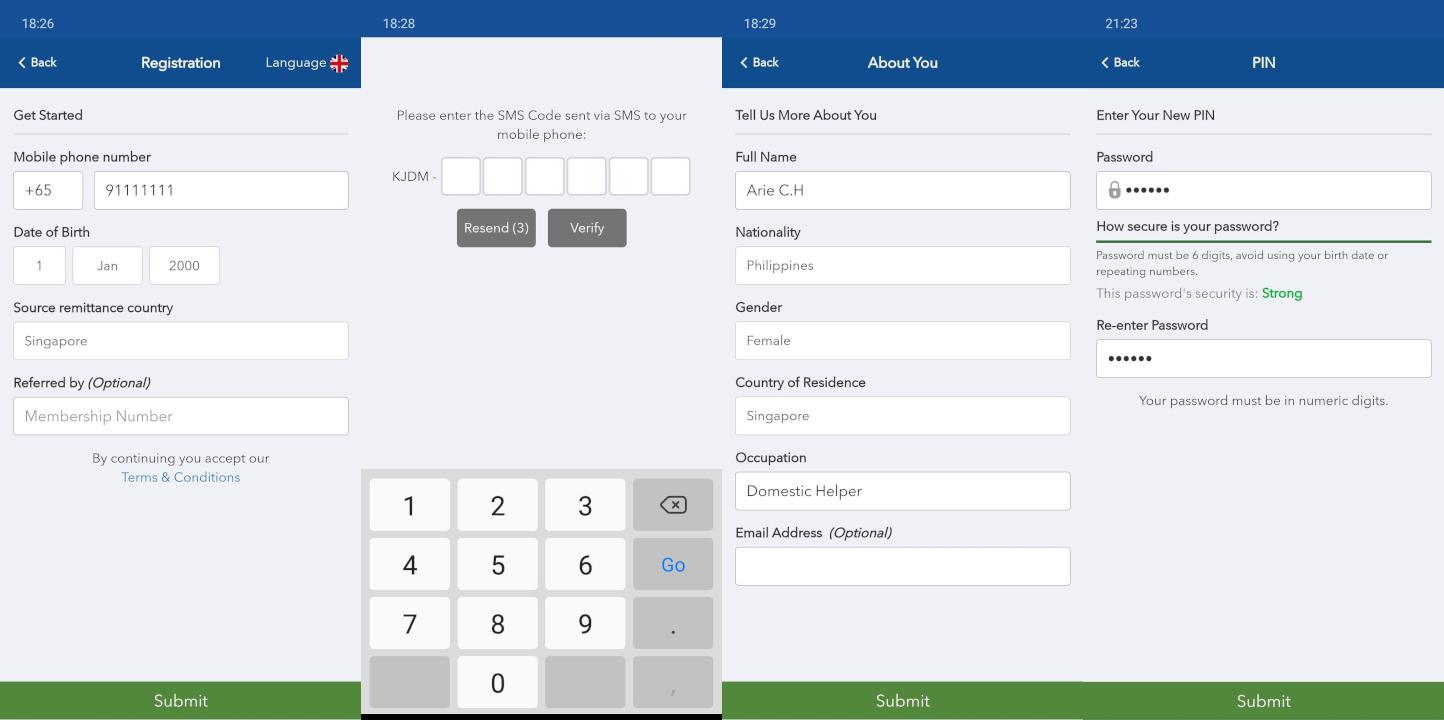
1.1 How to register with SingPass MyInfo?- Tap the ‘Not yet registered? Sign Up’ option to register for a FREE Pay2Home account.
- Enter your mobile number, date of birth and source of remittance country on the following screen.
- Enter the SMS OTP sent to your mobile number.
- Tap the ‘Submit via MyInfo’ option on the pop-up screen
- Tap the QR Code to log in to your SingPass account
- Once you have logged in to your SingPass account successfully, the required personal data will be pre-filled automatically. Check to ensure the details are accurate and tap ‘Submit’.
- Create your 6-digit pin and your registration is complete.
- Tap on the “Not yet registered? Sign Up” button.
- Fill in your personal information and login information, then tap on the “Submit” button.
- Once your registration is completed, upload your Identification Document and Proof of Address to start the verification process.
For more information on the registration process through Pay2Home Mobile application, please click on the following links:
- Video Guide - How to register via Pay2Home Mobile?
- Video Guide - How to verify your identity with Pay2Home Mobile application?
- Video Guide - How to register via SingPass MyInfo?
- PDF Brochure - How to register and use Pay2Home Mobile application?
- PDF Brochure - How to register and verify your identity with Pay2Home Mobile application?
Go to www.pay2home.com
- Click on the ‘Register’ button.
- Select ‘No’ if you have not previously used Pay2Home‘s money transfer services.
- Fill in your personal information and click on the ‘Next’ button.
- Fill in your login information and click on the ‘Submit’ button.
- Verify your email address by clicking on the verification link sent to your email.
- Once your registration is completed, upload your Identification Document and Proof of Address via the Pay2Home Mobile application to activate the verification process.
For more information on the registration process through Pay2Home Online, please click on the following links:
3. Pay2Home OutletsYou may visit any of our outlets and our friendly customer service team will be able to assist you with your registration
Pay2Home supports money transfers to 130+ countries worldwide, and we continue to expand our network. To view the most up-to-date list of supported destinations, please visit our Supported Currencies page. If your destination country is not currently available, please contact our customer support team here and we'll be happy to review future coverage options.